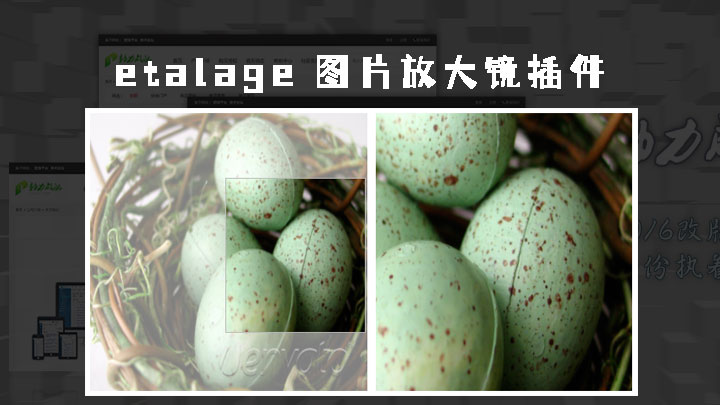
关于etalage
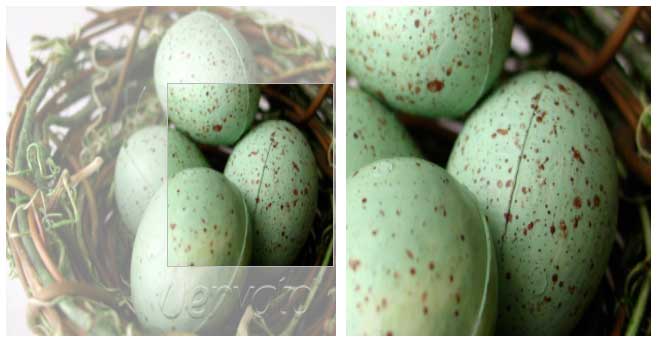
etalage是一款基于jquery的图片放大镜插件,不仅可以实现一个图片的放大镜,还可以实现一组相册图片的放大镜效果。 这里,我介绍下如何使用jQuery插件etalage。
如何使用etalage
步骤1:调用所需文件
<script type="text/javascript" src="js/jquery-1.11.1.min.js"></script>
<link rel="stylesheet" href="css/etalage.css">
<script src="js/jquery.etalage.min.js"></script>
步骤2:创建 HTML 标记
在无序列表中创建一个图像列表。一个图像作为源图像,另一个作为缩略图。
<!-- Give it any id or class to identify it with: -->
<ul id="etalage">
    <li>
        <!-- This is the large (zoomed) image source: -->
        <img class="etalage_source_image" src="/images/large_image_1.jpg" title="Optionally, your description goes here." />
        <!-- This is the thumb image source (if not provided, it will use the large image source and resize it): -->
        <img class="etalage_thumb_image" src="/images/thumb_image_1.png" />
    </li>
</ul>
步骤3:调用etalage
<script type="text/javascript">
    $(document).ready(function () {

        // If your <ul> has the id "etalage":
        $('#etalage').etalage({
            // These are the most common settings (because they are case specific)
            thumb_image_width: 300,
            thumb_image_height: 400,
            source_image_width: 1200,
            source_image_height: 1600,
            zoom_area_width: 800
            // Note: the last option does not end with a comma
        });

    });
</script>
参数说明
<script type="text/javascript">
$('#etalage').etalage({
    thumb_image_width: 330,//缩略图的宽度
    thumb_image_height: 330,//缩略图的高度
    source_image_width: 600,//大图的宽度
    source_image_height: 600,//大图的高度
    align:"left",//缩略图区域在屏幕的位置(好像只能是左右)
    zoom_area_width: 300,//放大区域的宽度-使用:justify调整全行排满(只是行)
    zoom_area_height: 500,//放大区域的高度
    zoom_area_distance: 200,//放大区域距离缩略图的距离
    zoom_easing: false,//淡入淡出效果
    click_to_zoom: false,//点击一下才可以放大
    zoom_element: "auto",//
    show_descriptions: false,//是否在放大区域显示图片描述的文字
    description_location: "top",//图片描述的文字在放大区域的位置
    description_opacity: 1,//图片描述的文字在放大区域的透明度
    small_thumbs: 3,//缩略图的个数
    smallthumb_inactive_opacity: 0.7,//小缩略图未选中的透明度
    smallthumb_hide_single: true,//
    smallthumb_select_on_hover: false,//小缩略图反页效果用hover实现(而不是点击事件)
    smallthumbs_position: "top",//略缩图的位置,下左右没有上
    magnifier_opacity: 0.5,//选择放大区域的除了选中的区域的透明度
    magnifier_invert: true,//是否在选择区域的显示对比差
    show_icon: false,//
    icon_offset: 20,//
    hide_cursor: false,//是否隐藏鼠标箭头
    show_hint: true,//
    hint_offset: 15,//
    speed: 200,//鼠标在缩略图位置移动的速度在放大区域的延迟单位是:ms
    autoplay: true,//是否自动轮播,默认是true,也就是默认是自动
    autoplay_interval: 1000,//自动轮播的时间间隔
    keyboard: true,//
    right_to_left: false,//轮播的方向是否是从右到左
});
</script>