文章内容
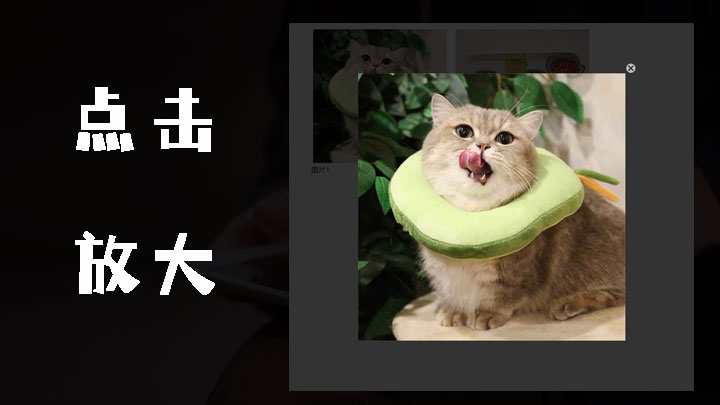
分享一个网站经常用到的Jquery点击图片放大效果:
html代码
<script src="query/1.8.1/jquery.min.js" type="text/javascript"></script>
    <style>
        *
        {
            margin: 0 auto;
        }

        .pic_list
        {
            overflow: hidden;
        }
        .pic_list li
        {
            width: 300px;
            float: left;
            margin: 10px;
            list-style: none;
        }
        .pic_list li img
        {
            display: block;
            width: 100%;
            padding: 4px;
        }
        #bgBox
        {
            position: fixed;
            top: 0;
            left: 0;
            background-color: #000;
            opacity: 0;
            filter: alphea(opacity=0);
            z-index: 999;
        }
        #picShow
        {
            position: fixed;
            z-index: 9999;
            opacity: 0;
            filter: alphea(opacity=0);
        }
        #picClose
        {
            position: fixed;
            width: 24px;
            height: 24px;
            background: url(images/close.png) no-repeat center center;
            opacity: 0;
            filter: alphea(opacity=0);
            z-index: 9999;
            cursor: pointer;
        }
    </style>
    <ul class="pic_list" id="show">
        <li><a title="图片1">
            <img src="images/1.jpg" alt="图片1" /></a> <span><a title="图片1">图片1</a></span>
        </li>
        <li><a title="图片2">
            <img src="images/2.jpg" alt="图片2" /></a> <span><a title="图片2">图片2</a></span>
        </li>
    </ul>
    <script>

        $(document).ready(function () {
            imgShow("show", "li");
        })


        function imgShow(obj, tName) {

            var img_list = document.getElementById(obj).getElementsByTagName(tName);

            for (var i = 0; i < img_list.length; i++) {
                img_list[i].onclick = function () {
                    newEle();
                    var s_img = this.getElementsByTagName("img")[0];
                    var src = s_img.getAttribute("src");
                    bgBox.style.width = viewWidth + "px";
                    bgBox.style.height = viewHeight + "px";
                    picShow.setAttribute("src", src);
                    picShow.style.left = (viewWidth - picShow.width) / 2 + "px";
                    picShow.style.top = (viewHeight - picShow.height) / 2 + "px";
                    picClose.style.left = (viewWidth + picShow.width) / 2 + "px";
                    picClose.style.top = (viewHeight - picShow.height) / 2 - 24 + "px";
                    bodyNode.appendChild(picShow);
                    bodyNode.appendChild(bgBox);
                    bodyNode.appendChild(picClose);
                    startMove(bgBox, 'opacity', 80, function () {
                        startMove(picShow, 'opacity', 100, function () {
                            startMove(picClose, 'opacity', 100, function () {
                                picClose.onclick = function () {
                                    bodyNode.removeChild(bgBox);
                                    bodyNode.removeChild(picShow);
                                    bodyNode.removeChild(picClose);
                                    bgBox.setAttribute("style", "");
                                    picShow.setAttribute("style", "");
                                    picClose.setAttribute("style", "");
                                }
                            })
                        })
                    });
                }
            }
        }


        function newEle() {
            bgBox = document.createElement("div");
            bgBox.setAttribute("id", "bgBox");

            picShow = document.createElement("img");
            picShow.setAttribute("id", "picShow");

            picClose = document.createElement("div");
            picClose.setAttribute("id", "picClose");
            bodyNode = document.getElementsByTagName("body")[0],

            viewWidth = getViewSize()['w'],
            viewHeight = getViewSize()['h'],
            timer = null;
        }

        function getViewSize() {
            return {
                "w": window['innerWidth'] || document.documentElement.clientWidth,
                "h": window['innerHeight'] || document.documentElement.clientHeight
            }
        }

        function getAttribute(obj, att) {
            if (window.getComputedStyle) {
                return getComputedStyle(obj, null)[att];
            } else {
                return obj.currentStyle[att];
            }
        }

        function startMove(obj, att, mtar, nextfn) {
            clearInterval(timer);
            var speed = 0;
            timer = setInterval(function () {
                if (att == 'opacity') {
                    var natt = parseFloat(getAttribute(obj, att)) * 100;
                } else {
                    var natt = parseInt(getAttribute(obj, att));
                }
                var speed = (mtar - natt) / 5;
                speed = speed > 0 ? Math.ceil(speed) : Math.floor(speed);
                if (natt == mtar) {
                    clearInterval(timer);
                    if (nextfn) {
                        nextfn();
                    }
                } else {
                    if (att == 'opacity') {
                        obj.style[att] = (natt + speed) / 100;
                        obj.style.filter = 'alpha(opacity:' + (natt + speed) + ')';
                    } else {
                        obj.style[att] = natt + speed + 'px';
                    }
                }
            }, 30);
        }
</script>在线演示:演示