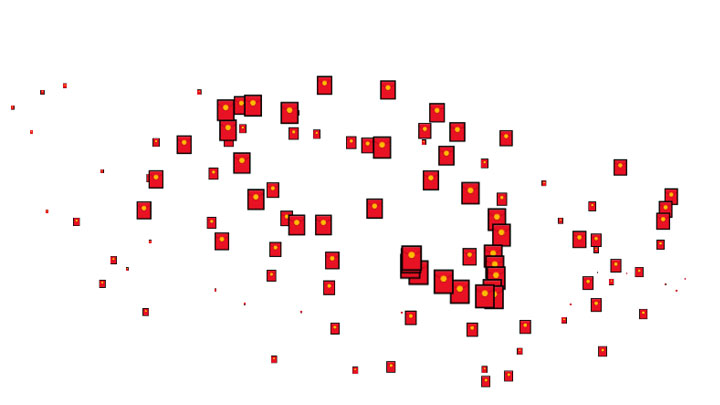
本文介绍如何使用javascript制作鼠标移动红包特效,红包图片可以替换本文提供几个素材:🧧,💰,🎁.
主要js代码与解析
//鼠标移动特效
(function () {
    var colors = ["#D61C59", "#E7D84B", "#1B8798", "#FF0000", "#00FF00"];
    characters = ["🧧"];
    elementGroup = [];
    //定义元素类
    class Element {
        //构造函数
        constructor() {
            num = Math.floor(Math.random() * characters.length);
            this.character = characters[num];
            this.lifeSpan = 120;
            this.initialStyles = {
                position: "fixed",
                top: "0",
                display: "block",
                pointerEvents: "none",
                "z-index": "10000000",
                fontSize: "25px",
                "will-change": "transform",
                color: "#000000"
            };
            //初始化
            this.init = function (x, y, color) {
                this.velocity = { x: (Math.random() < .5 ? -1 : 1) * (Math.random() / 2), y: 1 };
                this.position = { x: x - 10, y: y - 20 };
                this.initialStyles.color = color;
                this.element = document.createElement("span");
                this.element.innerHTML = this.character;
                ApplyStyle(this.element, this.initialStyles);
                this.update();
                document.body.appendChild(this.element);
            };
            //更新
            this.update = function () {
                //移动,缩放
                this.position.x += this.velocity.x;
                this.position.y += this.velocity.y;
                this.lifeSpan--;
                this.element.style.transform = "translate3d(" + this.position.x + "px," + this.position.y + "px,0) scale(" + this.lifeSpan / 120 + ")";
            };
            //销毁
            this.die = function () {
                this.element.parentNode.removeChild(this.element);
            };
        }
    }
    AddListener();
    //循环
    setInterval(
        function () {
            Rander();
        },
        1000 / 60);
    //添加事件监听器
    function AddListener() {
        //当前事件对象会作为第一个参数传入函数
        document.addEventListener("mousemove", onMouseMove);
        document.addEventListener("touchmove", Touch);
        document.addEventListener("touchstart", Touch);
    }
    //逐个渲染
    function Rander() {
        for (var i = 0; i < elementGroup.length; i++) {
            elementGroup[i].update();
            if (elementGroup[i].lifeSpan < 0) {
                elementGroup[i].die();
                elementGroup.splice(i, 1);
            }
        }
    }
    //鼠标移动事件函数
    function onMouseMove(t) {
        num = Math.floor(Math.random() * colors.length);
        CreateElement(t.clientX, t.clientY, colors[num]);
    }
    //添加元素
    function CreateElement(x, y, color) {
        var e = new Element;
        e.init(x, y, color);
        elementGroup.push(e);
    }
    //调整元素属性
    function ApplyStyle(element, style) {
        for (var i in style) {
            element.style[i] = style[i];
        }
    }
    //触摸事件函数
    function Touch(t) {
        if (t.touches.length > 0) {
            for (var i = 0; i < t.touches.length; i++) {
                num = Math.floor(Math.random() * r.length);
                s(t.touches[i].clientX, t.touches[i].clientY, r[num]);
            }
        }
    }
})();