正常的文本框(textarea)的高度是固定的,用户可以通过拖动来调整文本框的大小,但是在特定的情况下我们需要实现在输入内容后 ,文本框(textarea)高度能够根据输入的内容自动调整,这样首先能够显示所有文本的内容,也更加美观。下面我介绍一种如何用jQuery实现对textarea内容自适应高度功能
使用前
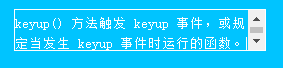
正常情况下如果内容超出本框(textarea)的尺寸会如下图显示:
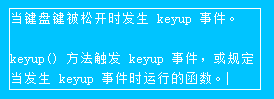
使用后
关键代码与说明
<textarea autoheight="true" placeholder="留言内容"></textarea>
    <script>
        //定义textarea 自动高度方法
        $.fn.autoHeight = function () {
            function autoHeight(elem) {

                //首先设置高度为0
                elem.style.height = 0;
                elem.scrollTop = 0; //防抖动
                //scrollHeight:元素整个的内容高度加上padding的高度不包含border
                elem.style.height = elem.scrollHeight + 'px';
            }
            this.each(function () {

                //调用autoHeight
                autoHeight(this);

                //按键被释放时触发keyup事件
                $(this).on('keyup', function () {
                    //调用autoHeight()
                    autoHeight(this);
                });
            });
        }

        //调用autoHeight()
        $('textarea[autoHeight]').autoHeight();

    </script>